Your Apple Watch is already a pro running watch.
What Apple gives runners, what is missing on a run, and what I built.
The first Apple Watch shipped in 2015. Eleven years later, it is the best smartwatch you can buy. Take calls from your wrist. Pay for coffee. Stream music with no phone in your pocket. Track your heart and your sleep. Get hurt in the backcountry, and it calls for rescue through outer space.
The Ultra goes further. Dual-frequency GPS. Redesigned heart-rate sensors. Satellite messaging. A depth gauge good to 40 meters. Two days of battery.
The Apple Watch is the best smartwatch on the market. Teo perfects it for runners and hikers.
I have worn Apple, Garmin, Suunto, and Polar watches for over 20 years. My Apple Watch was missing a few things. Running with it should have been so much better.
So I built it.
Three apps. One run.
Apple's running tools are good. They are also split across three apps.
App 1 of 3
Records the run
Workout
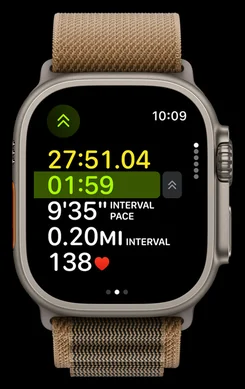
- Workout views
- Metrics, Metrics 2, Heart Rate Zones, Split, Segment, Elevation, Power, Activity Rings
- Fields
- Pick the metrics in each Metrics view; up to five on an Ultra
- Running form
- Power, cadence, stride length, ground contact time, vertical oscillation
- Structure
- Custom workouts, Pacer, Race Route, Track Detection
- Action button
- Start, mark a segment, Precision Start (Ultra)
- Battery
- Extended and Max Extended workout modes
App 2 of 3
Shows where you are
Maps
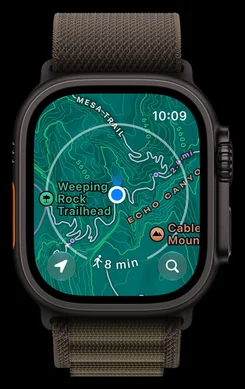
- Topographic maps
- Contours, trails, and trailheads where Apple has them
- Offline maps
- Download on iPhone, sync to the watch
- Custom routes
- Build a walk or hike, follow it turn by turn
App 3 of 3
Gets you back
Compass
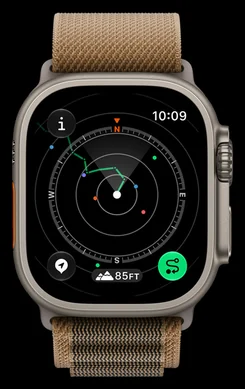
- Dial
- Heading, bearing, elevation, incline, coordinates
- Waypoints
- Drop one, then read distance and direction to it
- Backtrack
- Retrace your own trail
- Alerts
- Target elevation, last cellular connection
Workout records the run: pace, heart rate, zones, splits, elevation, and running power.
Maps shows where you are: topo maps, offline maps, and routes you can follow.
Compass gets you back: waypoints, and Backtrack to retrace your steps.
Strong tools. Then you start running.
Everything a runner needs. Never in one place.
You are ninety minutes up a trail you have never run. The path forks. You need three things, now: how far out you are, the map, and the way back.
Each one is in a different app. Press the crown. Find the icon. Tap. Do it with sweaty hands, mid-stride. Then do it again at the next fork.
Keep your head in the run.
Your pace. Your route. Your way back.
Check your effort, follow the trail, and retrace your steps. Teo brings your running metrics, map, and compass together inside one Apple Watch workout.
Apple Watch Ultra
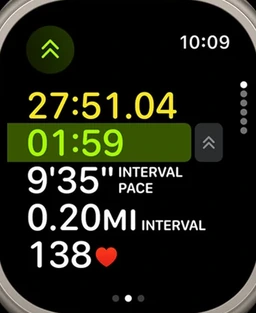
Workout
Rings, splits, heart rate
Teo
Your metrics
Pace, power, heart-rate zone, cadence and vert on one dial.
Keep running. It’s all one swipe away.
Workout, Maps and Compass on Apple Watch Ultra · Images: Apple
You should never have to leave your workout to see the map. So I built one that has everything you need.
One workout. Every page.
Teo is a complete workout app, built from the ground up for running. It records a real workout, saved to Health and counted in your rings. Every tool is one swipe away.
01Core
Time, then three rows you choose
02Splits
Every mile, with the climb in it
03Load
Time in zone, weighted, live
04Elevation
Ascent, descent, grade, VAM
05Map
Your trail over your route
06Compass
The way back, with distance
I built each page for one job. Then I ran with it until it was right.
- 01Your numbers
- Time on top. Three rows you choose from nine metrics, in type you can read mid-stride.
- 02Your map
- Your trail, drawn live over your route. Topo maps work with no signal.
- 03Your way back
- Tap Backtrack. The dial points home along your own trail, with distance and time to go.
- 04Your pins
- One tap marks the car, a spring, a junction. Every pin saves the distance where you dropped it.
- 05The climb, and the cost
- Ascent, descent, grade, and climbing speed. Load counts what the run cost, as you go.
- 06When the battery dies
- Teo backs up your run as you go. If the battery dies on the mountain, the run survives.
All of it is free. No account. No subscription. Your health data stays on your devices.
Meet the PRO faces.
Everything above is free. Pro faces are for runners who want more. Three instruments, each with its own typeface, each drawn for every watch size. Configure every dial and metric from your iPhone. See exactly what you want on your run.
Chronograph
A full-bezel tachometer. Sweep bezel, zone arc, twin subdials.
Modular
Heart rate up the left rail, power up the right, a radar of your last 250 m.
Analog
A typewriter ledger. Turn the crown for run, heart, and weather.
Pro faces are a one-time purchase. No subscription. Everything you need to run stays free.
Get Teo
The best watch for runners. Period.
Free on the App Store. No account. No subscription.
Straight answers.
Is it hard to set up?
No. Install Teo on your iPhone. The watch app comes with it. Allow Health access and press Start.
Do I need an account?
No. Record, navigate, and train without one. Signing in is optional.
Where does my data go?
Nowhere. Your numbers are calculated on your iPhone and watch. Your health data stays on your devices unless you share a run to Strava. I never see your runs.
Is it really free?
Yes. Recording, the map, the compass, pins, and training are free. No subscription. Pro faces are optional one-time payments.
Which watches does it work on?
Any Apple Watch on watchOS 10 or later, paired with an iPhone on iOS 17.
What are the limits?
Battery is still an Apple Watch battery: a long day, longer on an Ultra in Long Run mode, not a week. Download topo maps before you lose signal. Teo shows your route and your way back, not turn-by-turn directions.
How does it compare to the built-in apps?
Apple's tools sit in separate apps. Teo puts them in the run.
The job
Built in, and where it lives
In Teo, one workout
Choose your data fields
WorkoutMetrics views, up to five fields
Core: three rows, nine metrics to pick from
See the map mid-run
MapsTopographic map
Map page, inside the workout
Carry maps out of signal
MapsOffline maps synced from iPhone
Topo packs for a route corridor or an area you frame
Follow a planned route
MapsCustom routes, turn by turn
Route line under your live trail
Find the way back
CompassBacktrack
Backtrack to Run Start or any pin, with distance and time to go
Mark a spot
CompassWaypoints
Tap PIN on Controls. Distance stamped.
Read the climb
WorkoutElevation view
Elevation page: ascent, descent, grade, VAM
Know what the run cost
ActivityTraining load, after the run
Load page, live, by heart-rate zone
Weather, timers, music
3 appsEach in its own app
Weather, Timers, and Media pages
Cost
Included with the watch
Free. No account, no subscription.
Get Teo
Stop switching apps. Start running.
Free on the App Store. No account. No subscription.
Next: readiness. Apple's Readiness app arrived this fall on Series 12 and Ultra 4. Teo brings recovery to older watches too, with a model built for runners.